

Which Z-Wave Command Classes to Use for Your Z-Wave IoT Device and Why
Introduction
Command Classes are the key to Z-Wave’s application-level interoperability. All protocols have a standardized physical layer which ensures devices manufactured by different companies can communicate. Z-Wave’s physical layer is defined in the ITU-T G.9959 standard. The physical layer standard is necessary, but insufficient for IoT devices to communicate in a meaningful way. Command Classes are the key to enabling a controller to “know” how to turn on a light when motion is detected and adjust the thermostat to the liking of the user. Command Classes are defined in the Application Work Group Z-Wave Specification available on the Z-Wave Alliance web site.
The “spec” is over 1300 pages long. If you need help sleeping one night, crack this open and you’ll be off to lala land in no time! Fortunately, it is not a document you read from cover to cover. It is more like a dictionary, where you look up specific items to understand exactly how an IoT device communicates in an interoperable way, so all parties properly communicate the information. I make extensive use of the bookmarks bar in the PDF reader to quickly jump to the section I need. Search is also valuable to find the answer to a specific question.
When you first open the specification, you’ll see many versions of a command class and numerous ones that are obsolete or deprecated. If a command class is obsolete, you cannot use it ever and as a controller you don’t have to support it. Deprecated command classes are mostly old versions, and you must use the newer ones. Note that it is NOT required to support the latest version of a command class. For example, Battery Command Class version 1 is perfectly fine for most devices. Versions 2 and 3 add extra information for special types of batteries, but version 1 is fine for most IoT devices with simple batteries.
Another key Z-Wave file is the ZW_classcmd.h file which is in the SDK. This file explicitly defines every field of every command in every command class. The spec gets you to the right command, but the ZW_classcmd.h file defines the exact syntax and spelling of the fields you need to put in your code. Fortunately, VS Code does a pretty good job of filling most of this in for you when using Simplicity Studio V6. I’ll go into more coding details in the next blog post.
There are eight sections to the spec:
| 1 | Introduction | |
| 2 | Application Command Classes | Majority of the Command Classes |
| 3 | Management Command Classes | Z-Wave & Device Management |
| 4 | Transport-Encapsulation Command Classes | Security & transport encapsulation |
| 5 | Network-Protocol Command Classes | Controller related CCs |
| 6 | Command Class Control | Command Class rules |
| 7 | Device Type Specification | Mandatory CCs |
| 8 | Role Type Specification | More rules and power source types |
Where Do I Start?
What’s the first step in coding a new Z-Wave Product? You’ve already chosen the sample app in the 2nd blog and that choice goes a long way toward your first step here. Start with the Device Type V2 Specification section 7. There is a long list of common devices like switches, locks, bulbs, thermostats, sensors, and gateways. Your device should fit into one of these broad categories. Each Device Type specifies a list of mandatory command classes.
Mandatory Command Classes
The sample app typically provides all the mandatory command classes so there is no work required here. But you should double check as requirements change and sometimes the code lags the specification. The Z-Wave Certification Test Tool will do a comprehensive check for all the mandatory command classes so it’s worth a few minutes to check early in the project development.
Mandatory command classes are mandatory for a reason! They significantly improve interoperability! They help make most devices operate in a predictable way and provide similar information. They also ensure your device can be probed for all salient features enabling the hub to offer all your features to the user. This allows your product to be supported the day it starts shipping without waiting for the hub vendor to “support” your product thru manual coding. Note that section 7.2 of the specification has a list of mandatory command classes that are required for all products. These include Z-Wave Plus Info which helps the hub know exactly the general type of device, Association which tells the device where to send unsolicited reports, Firmware Update which enables updates in the field which is now required for the new global security initiatives.
Command Classes for My Product
With the mandatory command classes out of the way, the next step is to determine what other command classes are needed. The sample application typically has a few more command classes included to provide the functionality for a specific device. For example, a thermostat would start using the door lock sample app since there isn’t a thermostat sample app. Most thermostats are LSEN devices the same as door locks but of course they need different command classes. The first thing to do is remove the door lock related command classes.
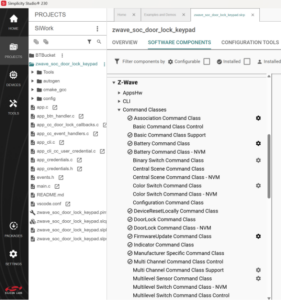
For Silicon Labs you use Simplicity Studio V6 and simply Install or Uninstall command classes you do or don’t want. Open the .SLCP file in the project, select Software Components then scroll down to Z-Wave and open the Command Classes pull down. Click on all the door lock related command classes and uninstall them. Next, you want to add the Thermostat related command classes. But wait, there are none! This is where you must write them yourself. For Trident there is a separate cmake library for each command class which are commented out so you simply uncomment the ones you need.
Most devices require several command classes to create a complete product. Using the thermostat example, in addition to Thermostat Mode, Set Point, Fan Mode, Fan State, Setback you would also typically include Multilevel Sensor for the temperature and humidity sensors, Time and Schedule to have the typical seven-day setback schedules, and perhaps other command classes that make your product unique. There isn’t one way to assemble the command classes which is how you can make your product stand out but still be interoperable.
What to do for Command Classes That Haven’t Been Implemented Yet
Not all command classes have been implemented yet. Can AI write them? Probably – let me know if you can create a working command class with AI. None of the thermostat related command classes are in the open-source repository as mentioned above. What do you do? You must implement them yourself. Ideally you should submit your implementation to the open-source repository to help the entire community. This is a pretty high-bar as you must implement every command in the command class and follow the coding rules as well as provide test code to ensure the code is bug-free (maybe bug-lite?). I’m currently implementing Geographic Location and Time command classes which I hope to Pull Request into the repository in the coming months.
The key is to copy a similar command class to use as a starting point. The first step is to implement the REGISTER_CC_V6 macro. Each existing command class has this macro, or an earlier version of it, at the bottom of the main command class file. The macro installs the command class into the Node Information Frame (NIF) and provides links to the command class handlers and other functions. The NIF is the list of command classes the device supports which the hub uses to interrogate the device to learn what it can do when first joined to a network. Next, implement the handlers that decode all the commands of a command class and return a report when a Get command is received. The command to send a frame is zaf_transport_tx() which puts the message into the FreeRTOS queue and sends it to the SDK. A callback function is called when the message is sent with a status of success or not.
Support vs. Control
One of the main confusion points about command classes is if your device will Support or Control it. In some cases, your device may do both! This is an important distinction for Z-Wave certification as different test cases will be applied to your device depending on which one is implemented. Controllers in particular are a bit confusing since in many cases they both Support and Control specific command classes. The choice of Support or Control is often simple: Your device Supports a command class if it receives a GET or SET command and replies with a REPORT. Your device Controls a command class if it sends a GET or SET command. For most end devices and most command classes this rule is straightforward. The problem comes in with things like Time Command Class which most end devices (usually door locks and thermostats) BOTH Support and Control it. They Support Time because they will receive a SET command to set their internal clock to the current time. But, more often they will SEND a GET asking for the current local time and receive a REPORT from the internet connected gateway with the local time accurate to a few milliseconds.
There is a lot more work involved in fully implementing a command class, but I don’t have the space to go through an entire example. However, you can review my efforts in implementing Geographic Location command class thru my Geographic Location CC github repository. Is there something you don’t like in the spec? Get involved in the Application Working Group and you can fix it! If there is a command class that has not been implemented, jump in and submit it for review. Z-Wave is an open standard and relies on the community to keep it fresh and keep the code coming.
Next Steps
Part 4 of the Developer’s Journey will discuss details about coding and debugging Z-Wave firmware. This is a longer blog as there is a lot to cover. I will include several screen shots and recommend tools that I find invaluable. As we continue along the Z-Wave Developer’s Journey, I welcome your comments and questions. Please feel free to reach out to me directly via email.
About the Author
Eric Ryherd has been at the forefront of Z-Wave innovation since 2003, beginning as a consultant and later serving as a Field Application Engineer at Silicon Labs. Over the course of his career, he has contributed to the design and development of a wide range of Z-Wave products, including sensors, remote controls, motorized window shades, and in-wall dimmers, many of which are on the market today.
Although he “retired” in 2022, Eric remains deeply engaged in embedded systems and Z-Wave development through his blog, DrZWave.blog, and ongoing IoT consulting projects. He is also a familiar face at Z-Wave Alliance Unplug Fests, where he frequently serves as the lead coordinator, supporting interoperability and developer collaboration.